
Take Full Control of Your Inventory with Intelligent, Real-Time Stock Management
Your centralized inventory control system—designed to manage warehouses, track stock movements, optimize valuation, and ensure complete visibility across your supply chain.
Challenges
Struggling with Inventory Inefficiencies?
Managing stock manually leads to blind spots, costly errors, and disconnected operations. These are the real problems businesses face every day.
SBOSS Stock Module puts control back where it belongs — with warehouse managers, procurement teams, and business owners.
Lack of Real-Time Visibility
01No clarity on stock levels across warehouses leading to delays and stockouts.
Manual Tracking Errors
02Spreadsheet-based tracking causing mismatches, losses, and inaccuracies.
No Proper Audit Trail
03Difficulty in tracking stock movements, valuation changes, and discrepancies.
Disconnected Systems
04Inventory not synced with purchase, sales, and accounting operations.
Introduction to the Stock Module
The core inventory management hub that enables businesses to streamline operations from procurement to delivery.
Key Functions
Track physical goods across multiple warehouses
Manage item valuation using FIFO or Moving Average
Maintain complete stock movement history
Integrate with Buying, Selling, Manufacturing, and Accounting
It Also Supports
Perpetual & Periodic Inventory Accounting
Batch & Serial Number Tracking
Quality Inspection Workflows
Automated Reordering & Material Requests
KEY CAPABILITIES
SBOSS Stock Module delivers complete inventory control — from warehouse setup to advanced analytics — all in one unified platform.
Multi-warehouse management with hierarchical structure
Item master with variants, attributes, and pricing
Complete stock lifecycle tracking
Serial & batch traceability
Perpetual inventory with automatic GL entries
Quality inspection integration
Automated reorder and material request generation
Landed cost allocation
Physical stock reconciliation tools
Advanced reporting system
Multi-warehouse management with hierarchical structure
Item master with variants, attributes, and pricing
Complete stock lifecycle tracking
Serial & batch traceability
Perpetual inventory with automatic GL entries
Quality inspection integration
Automated reorder and material request generation
Landed cost allocation
Physical stock reconciliation tools
Advanced reporting system
Setup & Configuration

Stock Settings
Configure global inventory behavior
- Valuation Method: FIFO / Moving Average
- Negative Stock Control
- Serial Number Automation
- Default Warehouse Setup
- Barcode Enablement
- Auto Material Request on Reorder

Warehouse Setup
Organize your storage locations
- Hierarchical warehouse tree structure
- Types: Stores, Transit, Virtual
- Linked GL accounts for valuation
- Parent-child grouping for organization

Item Master
Central entity for all goods
- Item Code, Name, Group
- UoM (Unit of Measure)
- Stock / Non-stock toggle
- Serial / Batch tracking
- Valuation Method
- Shelf Life

Item Variants
Create configurable products using attributes
- Generate multiple variants from templates
- Size, Color-based products
- Attribute-based configuration

Opening Stock
Initialize your inventory
- Use Stock Reconciliation tool
- Define initial quantity and valuation
- Automatically posts stock and accounting entries

Stock Accounting
Choose your accounting method
- Perpetual: Real-time GL posting for every movement
- Periodic: Manual adjustments at period-end
The Complete Stock Transactions
Every stock movement — from receiving goods to shipping orders — is tracked, validated, and posted to accounting automatically.
No manual entries, no reconciliation headaches. SBOSS Stock Module handles every transaction with full traceability.
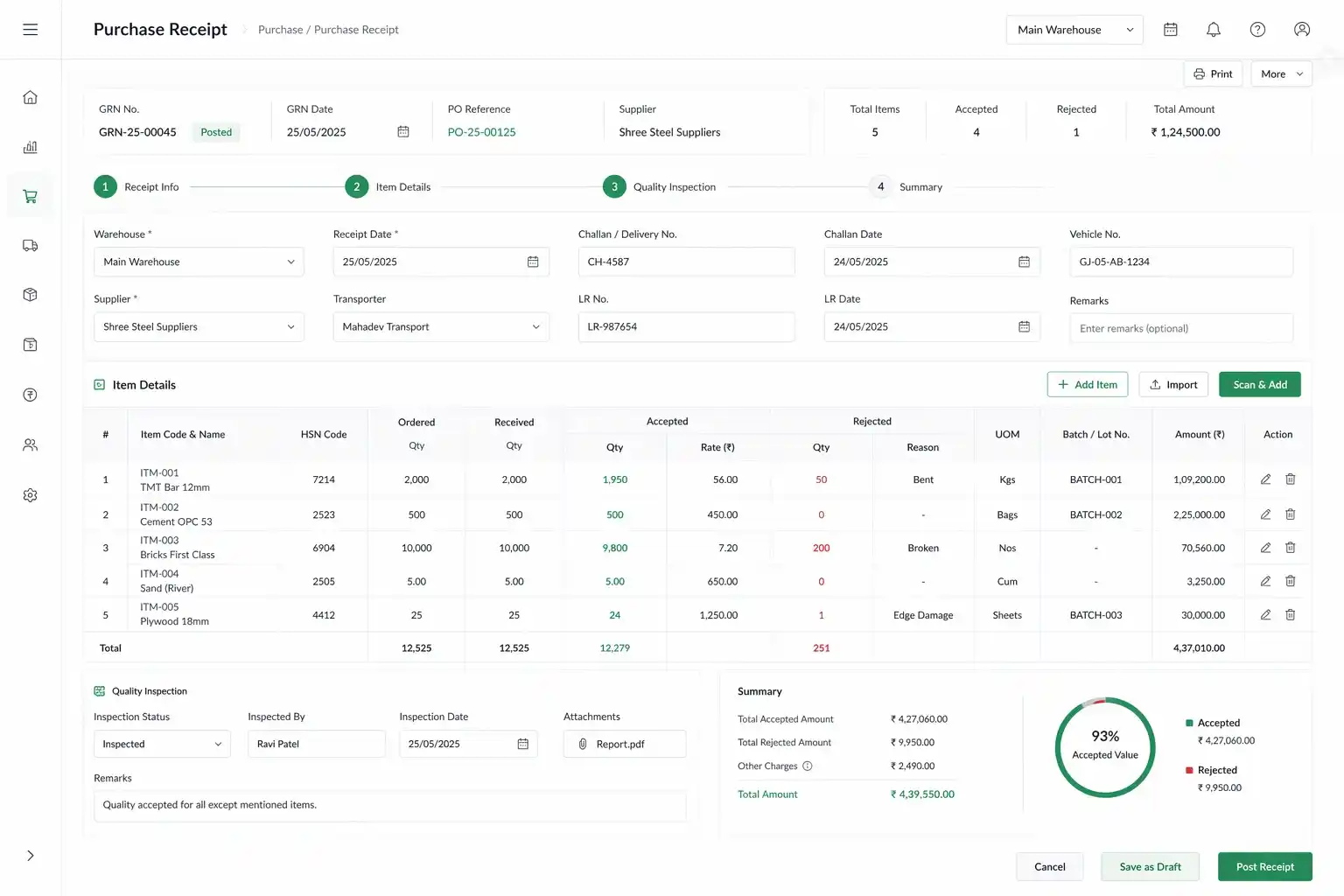
Purchase Receipt
Records incoming goods, handles accepted & rejected quantities, supports quality inspection, and updates stock and valuation automatically.
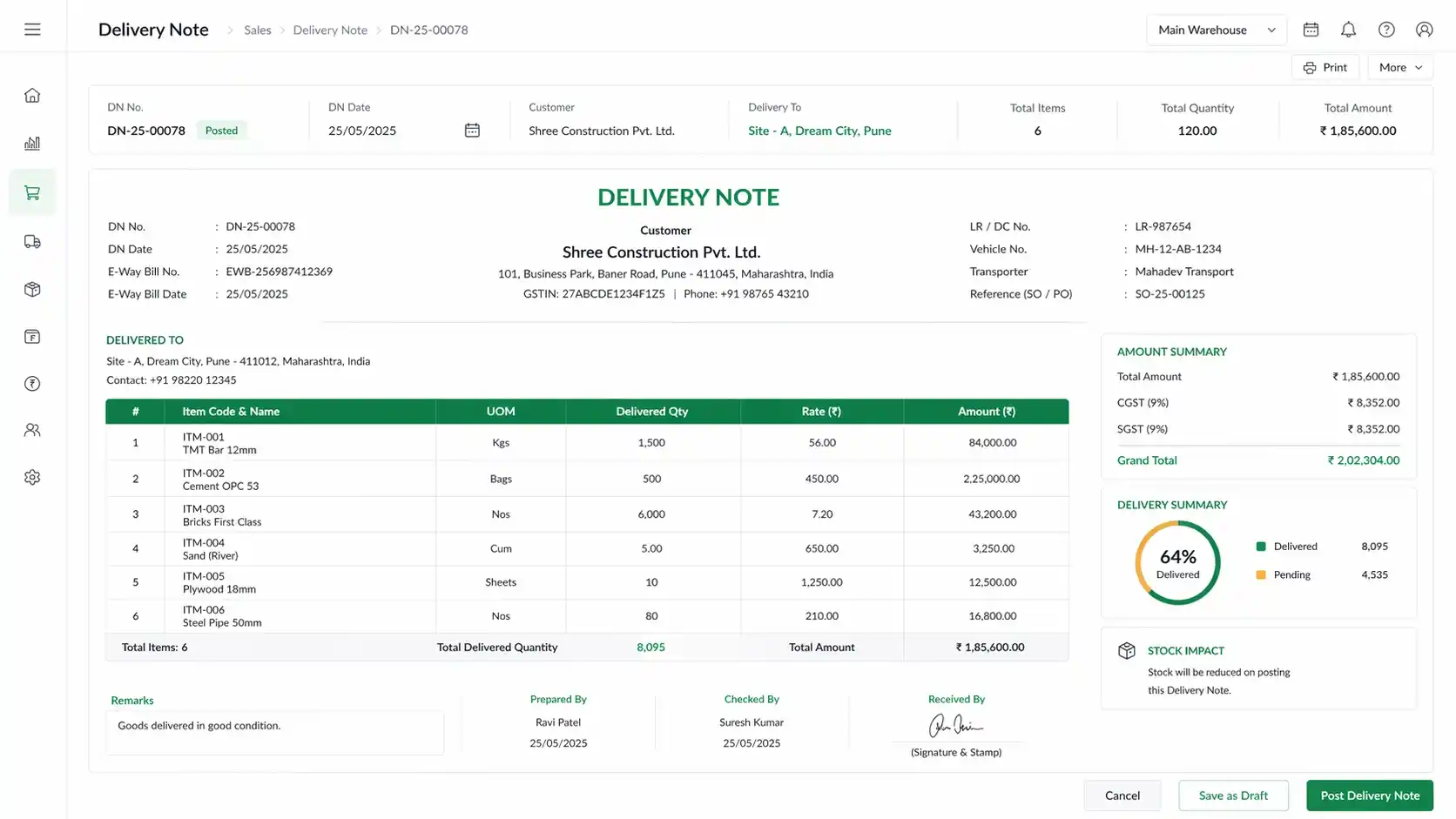
Delivery Note
Records outgoing goods, supports partial deliveries, and reduces stock while posting accounting entries in real time.
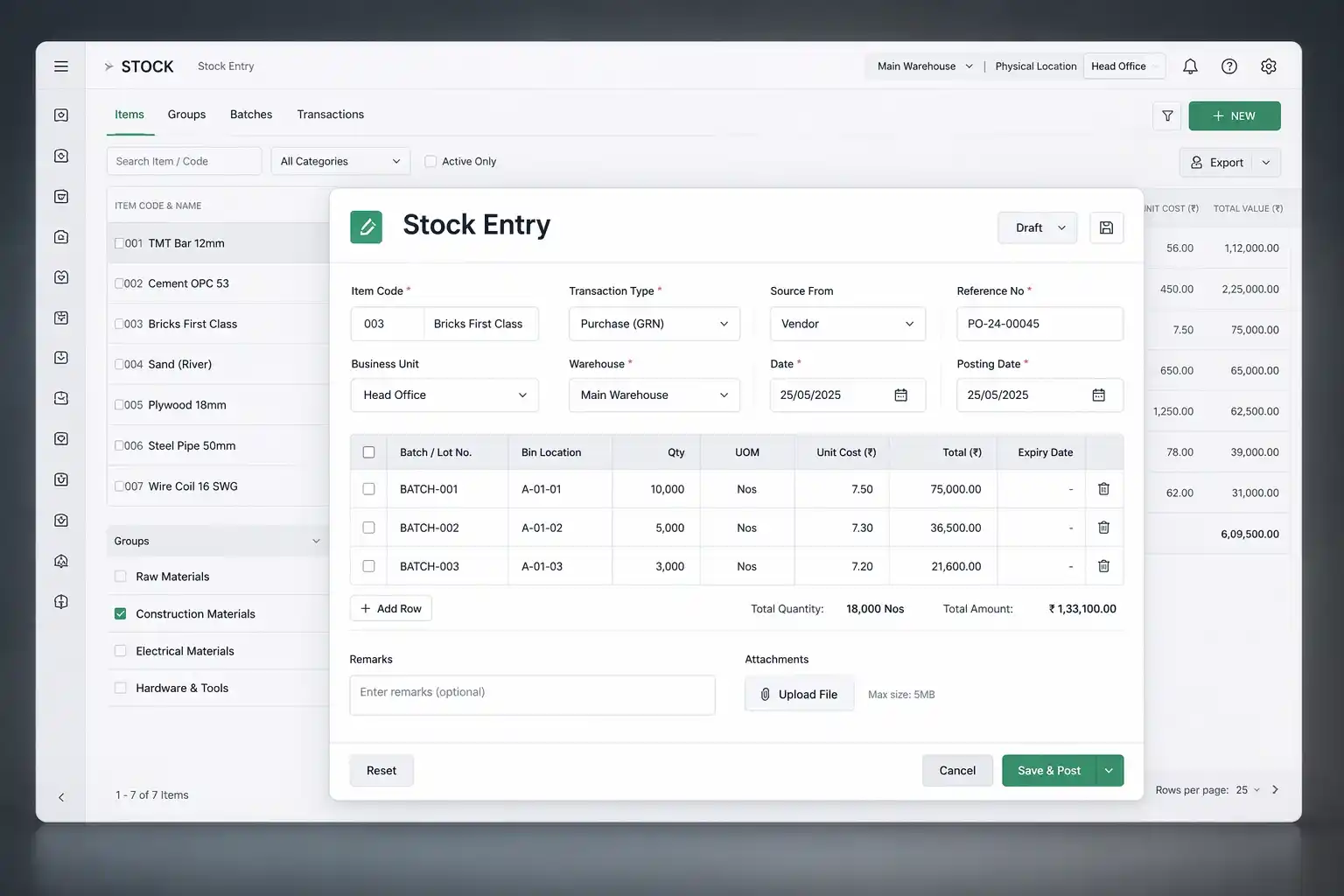
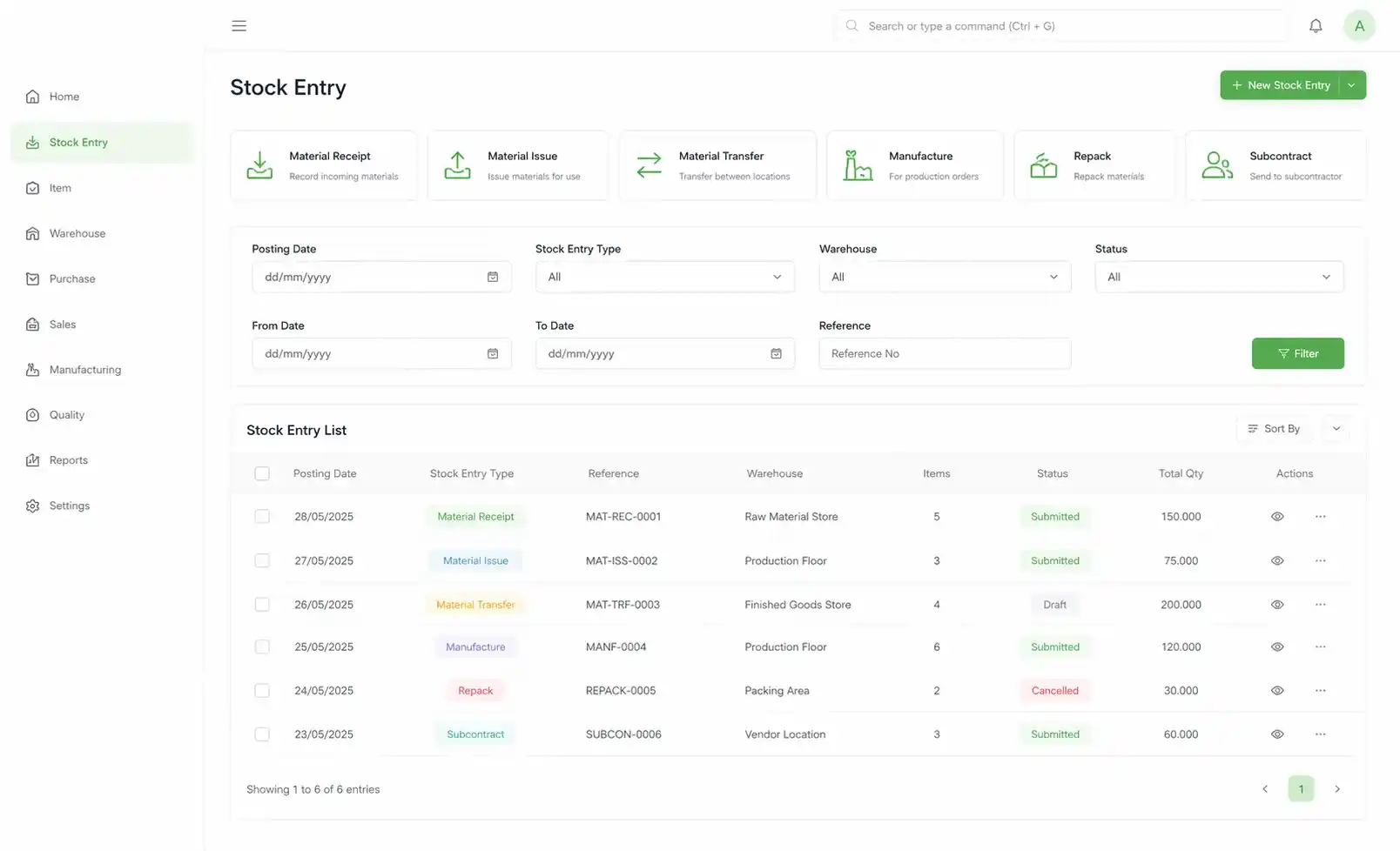
Stock Entry
Handles Material Receipt, Issue, Transfer, Manufacture, Repack, and Subcontracting — all in one unified entry.
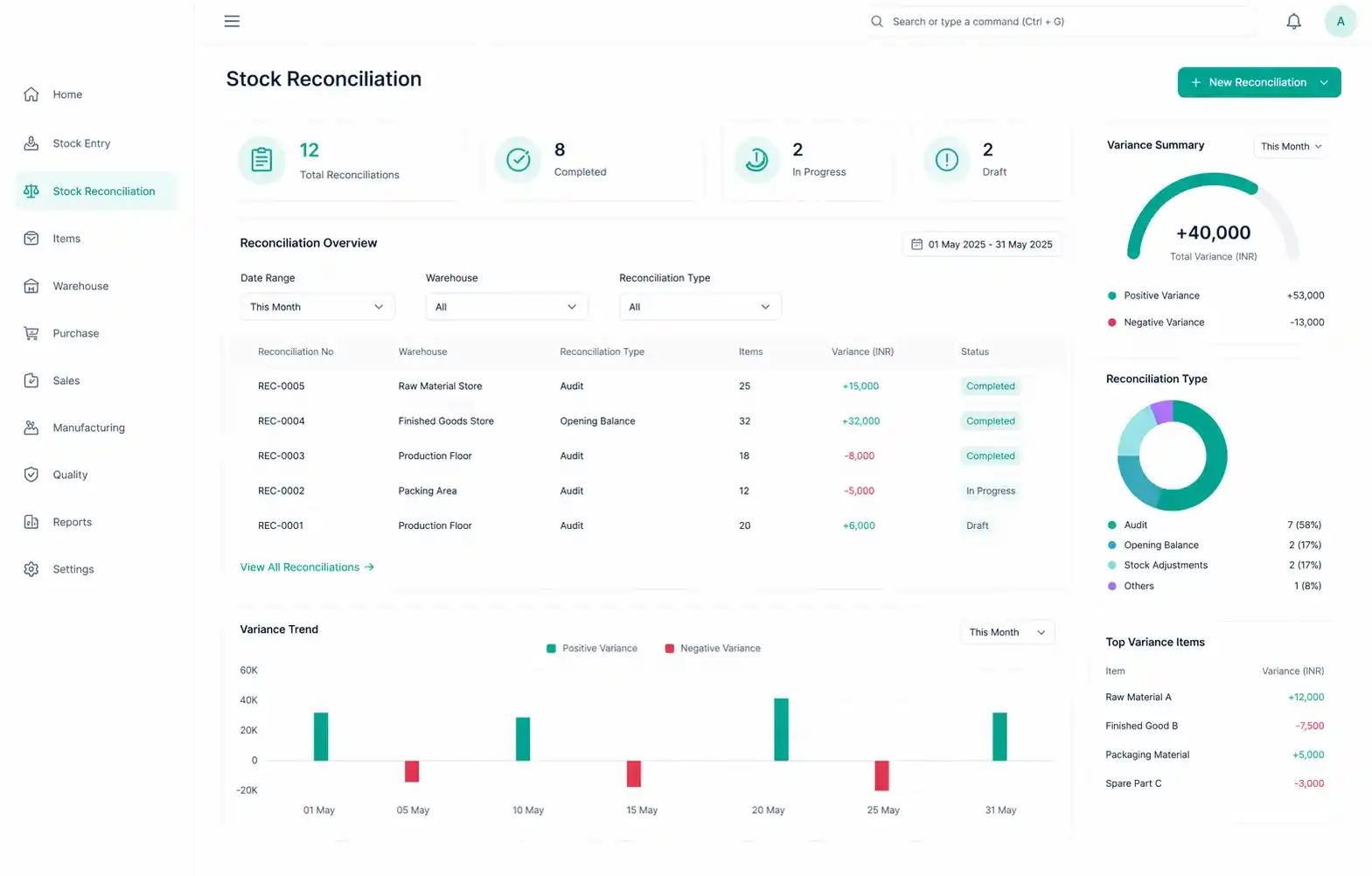
Stock Reconciliation
Corrects stock mismatches and is used for periodic audits or setting opening balances accurately.
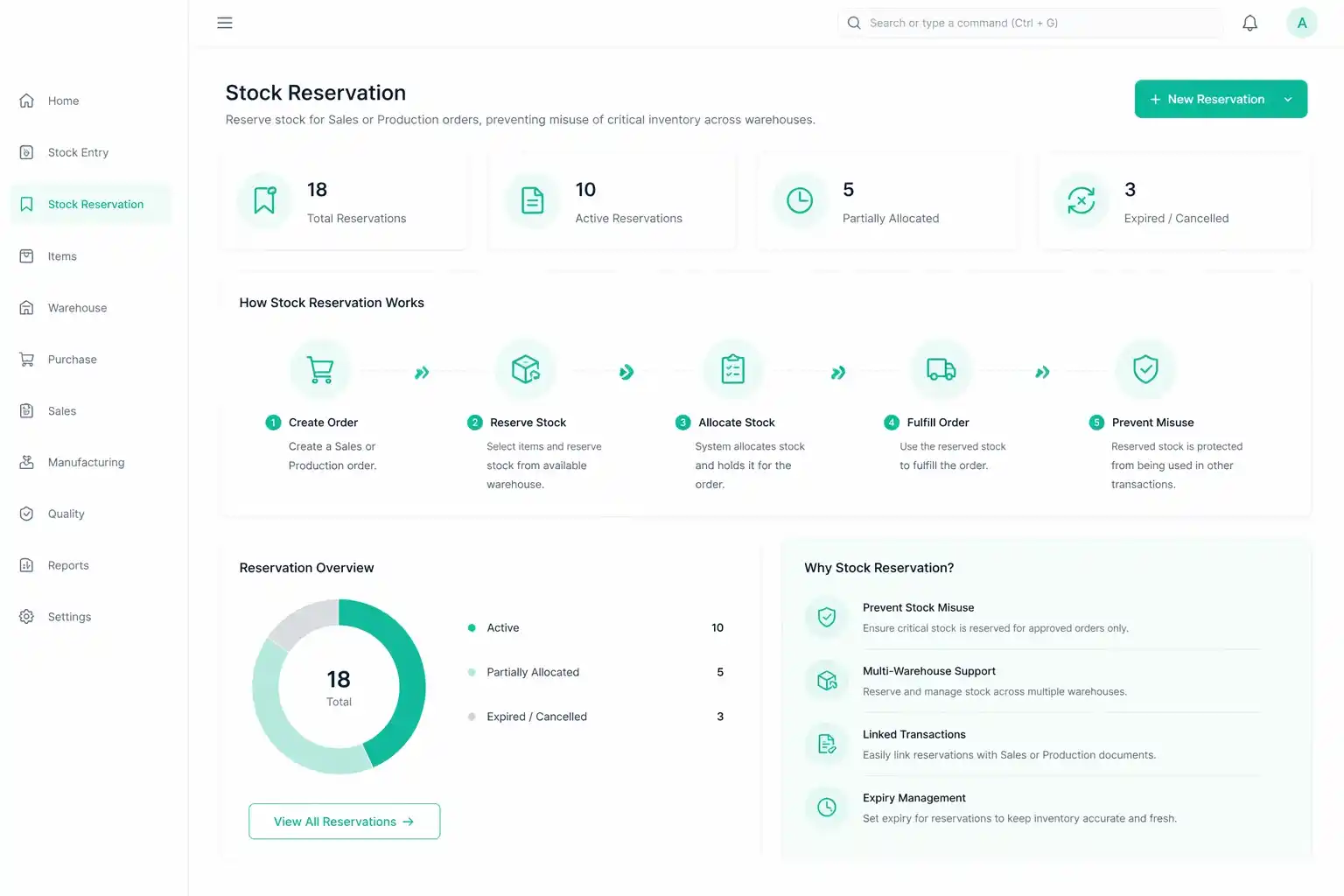
Stock Reservation
Reserve stock for Sales or Production orders, preventing misuse of critical inventory across warehouses.
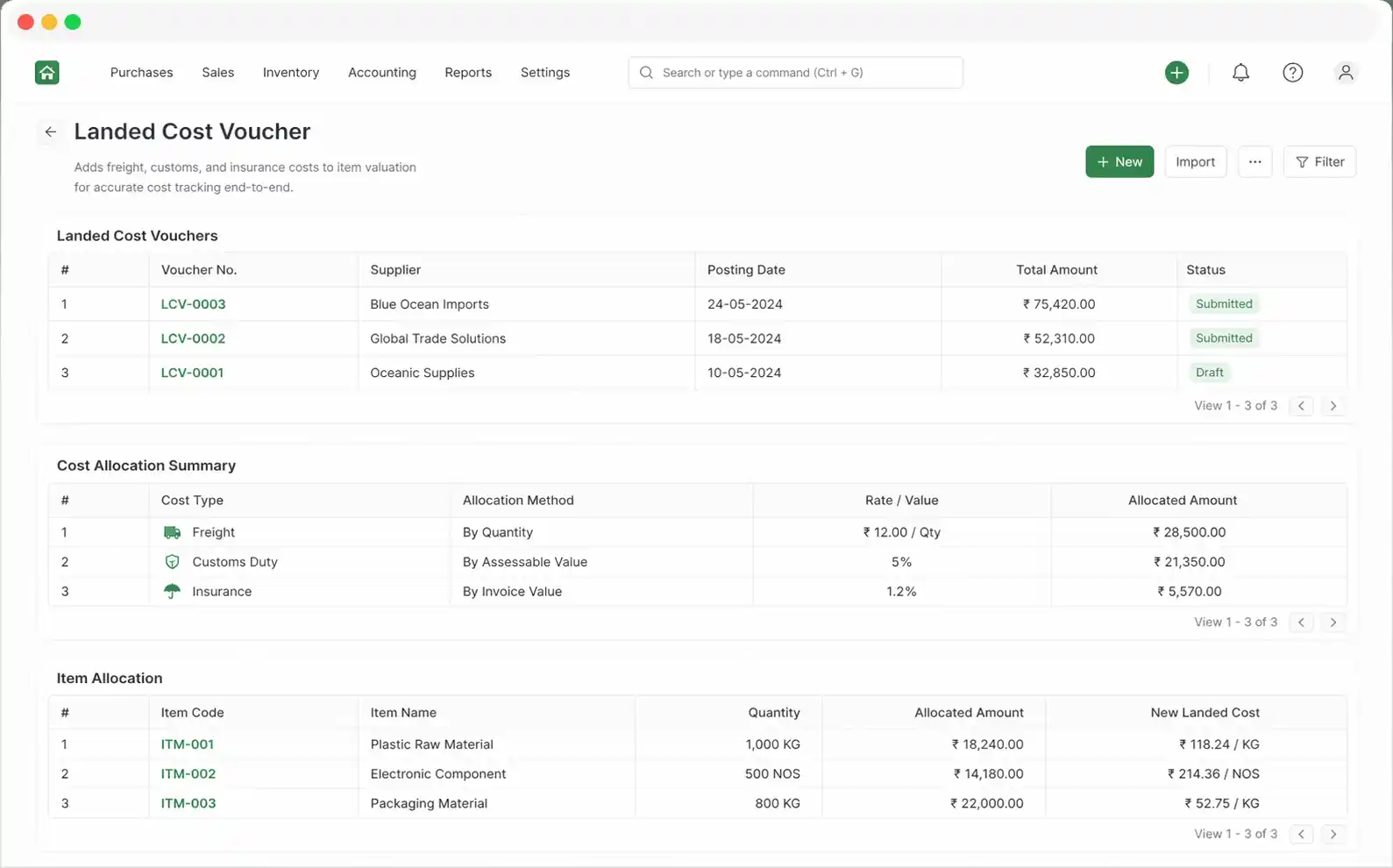
Landed Cost Voucher
Adds freight, customs, and insurance costs to item valuation for accurate cost tracking end-to-end.
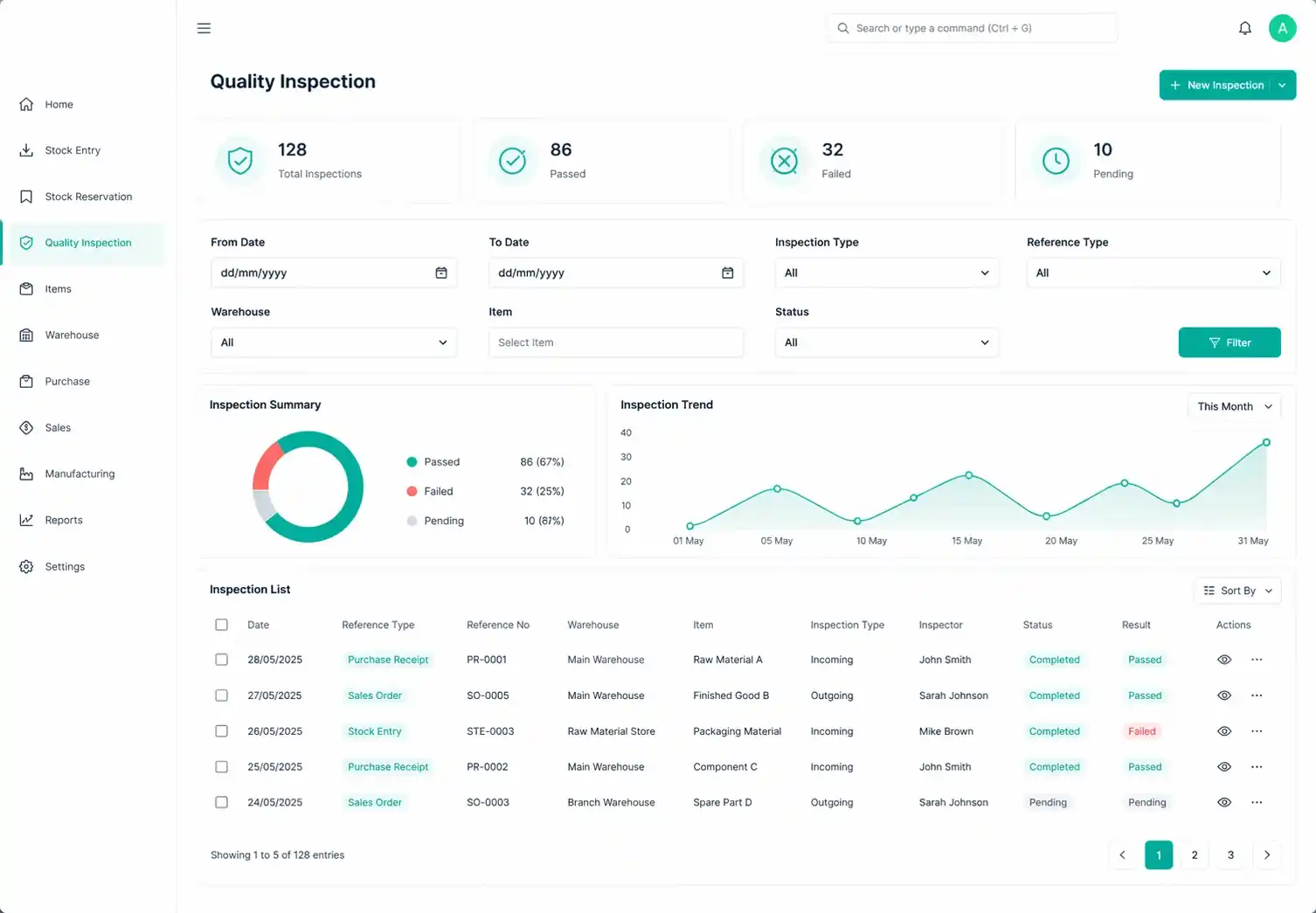
Quality Inspection
Mandatory checks on inbound and outbound stock using template-based inspection criteria with Pass/Fail validation.
A well-structured stock transaction system ensures accuracy, reduces losses, and keeps your supply chain running without disruption. Your inventory is critical. Every movement should be tracked, not guessed.
Serialized & Batch Inventory

Serial Numbers
Unit-level tracking
Lifecycle visibility from purchase → sale → warranty

Batch Numbers
Group-based tracking
Expiry & manufacturing date management

Serial & Batch Bundle
Bulk assignment for transactions
Structured tracking system
Item Pricing
Item
Pricing
Setup
Price Lists
Manage multiple price lists for buying and selling:
- Multiple selling & buying price lists
- Customer/supplier-specific pricing
Item Price
Control per-item pricing with flexibility:
- Store item-specific pricing
- Validity-based pricing rules
Pricing Rules
Automate discounts and promotions:
- Automated discounts & offers
- Conditional logic (Qty, Customer, Amount)
- Free item promotions
Stock Reports
Comprehensive reporting for decision-making
Available Reports
- Stock Ledger (full audit trail)
- Stock Balance (current stock levels)
- Quick Stock Balance
- Closing Stock Summary
- Stock Value vs Account Comparison
- Batch & Serial Traceability
- Negative Stock Reports
Stock Ledger Key Metrics
Advanced Stock Features
Pick List
Guided picking for warehouse staff with FIFO & batch-based picking.
Putaway Rules
Auto-assign storage location based on item type & capacity.
Inventory Dimensions
Track stock by Project, Cost Center, Customer for enhanced reporting.
Auto Material Request
Trigger procurement automatically based on reorder levels.
Sample Stock Retention
Retain quality samples from batches. Auto-transfer to sample warehouse.
Stock Closing Entry
Snapshot of inventory at a specific time. Improves reporting performance.
Repost Item Valuation
Recalculates valuation after backdated entries.
Inventory Valuation Methods
FIFO
First In, First Out
- Uses oldest stock first
- High accuracy for fluctuating prices
Moving Average
Running Average Cost
- Maintains running average cost
- Smoothens price variations
Integration with Other Modules
Buying
Purchase Order → Receipt → Invoice
Selling
Sales Order → Delivery → Invoice
Accounting
Auto GL entries
Manufacturing
Work Orders & production tracking
Quality
Inspection workflows
Assets
Convert stock to fixed assets
Operational Workflows
Purchase Cycle
Sales Cycle
Internal Transfer
Physical Audit
Roles & Permissions
Stock Manager
Full control
Stock User
Transaction access
Purchase Manager
Procurement flow
Delivery Manager
Dispatch handling
Accounts Manager
Valuation & reconciliation
System Manager
Full system access
Common Issues & Troubleshooting
Quick Navigation
Stock Settings
Configuration
Warehouse
Setup
Item
Creation
Transactions
Stock operations
Reports
Analytics
Tools
Reconciliation & valuation
Streamline Your Inventory. Eliminate Errors. Gain Full Control.
The SBOSS Stock Module empowers your business with precision, automation, and real-time intelligence—ensuring your inventory is always accurate, optimized, and audit-ready.